
What Is Two-Factor Authentication (2FA)?
Two-factor authentication (2FA) is a security process that requires you to verify your identity in two separate ways before gaining access to an account. Instead of relying on just a password, 2FA adds a second layer — something only you can physically access or know — making it dramatically harder for attackers to break in.

Think of it like a safe that requires both a combination and a physical key. Even if someone steals the combination, they still can’t open it without the key.
In practice: You enter your password (first factor), then you’re asked for a one-time code from your phone or a fingerprint scan (second factor).
Why Passwords Alone Aren’t Enough in 2026
Passwords have been the default for decades, but they’re increasingly unreliable:
- Data breaches expose billions of credentials every year. If you’ve reused a password, attackers can try it across hundreds of sites automatically (called credential stuffing).
- Phishing emails trick users into handing over passwords directly.
- Brute force attacks use modern computing power to guess millions of password combinations in seconds.
The uncomfortable truth: even a complex, unique password can be stolen through no fault of your own. 2FA is the safety net that catches you when that happens.
The Three Types of Authentication Factors
All 2FA methods pull from these three categories:
| Factor | What It Means | Examples |
|---|---|---|
| Something you know | A secret only you know | Password, PIN, security question |
| Something you have | A physical device you possess | Phone, hardware key, smart card |
| Something you are | Your biometric identity | Fingerprint, face scan, voice |
True 2FA combines factors from different categories. Two passwords is not 2FA — it’s just two passwords.
Types of 2FA Methods (Ranked Best to Worst)
1. Hardware Security Keys (Most Secure)
Physical USB or NFC devices like the YubiKey plug into your device or tap your phone. They use phishing-resistant protocols (FIDO2/WebAuthn) that make them virtually impossible to spoof remotely. Best for high-risk users: executives, journalists, developers.
Pros: Phishing-resistant, no battery needed, works offline Cons: Cost ($25–$70), can be lost
2. Authenticator Apps (Best for Most People)
Apps like Google Authenticator, Microsoft Authenticator, and Authy generate time-based one-time passwords (TOTP) — 6-digit codes that refresh every 30 seconds. Even if an attacker intercepts the code, it expires before they can use it.
Pros: Free, works offline, more secure than SMS Cons: Phone dependency, can be lost without backup
3. Push Notifications
Apps like Duo Security send a push notification to your phone — you simply tap “Approve.” Convenient, but watch out for MFA fatigue attacks, where attackers spam you with requests hoping you’ll tap approve by mistake.
4. SMS/Text Codes (Use Only If Nothing Else Is Available)
A code sent via text. Better than no 2FA, but vulnerable to SIM swapping, where an attacker convinces your phone carrier to transfer your number to their device.
Pros: No app needed, widely supported Cons: Interceptable via SIM swap or SS7 exploits
5. Email Codes
Similar weaknesses to SMS. If your email account is already compromised, this offers no real protection.
Do You Really Need 2FA? The Numbers Say Yes
Here’s what the data shows:
- 99.9% of automated attacks are blocked by MFA, according to Microsoft research
- 80% of security breaches could have been prevented with 2FA in place
- Despite this, 38% of large firms still don’t use it consistently
- The average cost of a data breach is $3.86 million, while implementing 2FA costs roughly $15 per user per year
The risk-to-reward ratio is undeniable. The cost of not using 2FA vastly outweighs the few seconds of inconvenience it adds to your login.
Why People Skip 2FA (And Why Those Reasons Don’t Hold Up)
“It takes too long.” Authenticator apps add about 10 seconds to login. That’s a fair trade for protecting your banking, email, and work accounts.
“I’m afraid of losing my phone.” Every major service offers backup codes — a set of one-time-use codes you can store securely offline. Set these up when you enable 2FA.
“It’s too complicated.” Modern apps like Google Authenticator require just three taps to set up on a new account. If you can scan a QR code, you can use 2FA.
Today’s modern life where most of the peoples’ personal or work life is digitalized and the latest technology provides access to your data easily almost at all times and anywhere. Any data like your personal photos, bank account details, your working project files, location of your car, kids even your pets. Sitting at one place we could operate and access our data. As we are getting the comfort of these technologies there is always a risk attached to it.
Yes, the data is available but the question arises is the availability only to the owner or to whom it has to accessible? Or is it also available to any other unauthorized user?
With the increasing convenience over the internet in the availability of the data, we are adding more and more data to the internet world. Both the personal and professional data that we need, we save them over the internet. With in the organization, the top most data which is a high priority to save are the details related to their customers and the personal data which is highly risky losing over the internet is their identity.
Many other data related to personal are saved over the internet which should not be accessed to any other unauthorized user like their Physical locations(GPS), their credit history, bank account and payment details, telephone numbers, and even the health conditions which have to be secured.
Similarly, in the working environment the data related to the business like their business secrets, customer information, marketing strategies and the sales they made, research and development details.
These data if lost could incur huge losses to the businesses or the personal lives and thus they need to protect them, secure them on top of without losing the availability of the data.

Daily the IT industry is trying to improve the security to protect these data stored online, and the hackers on the other side improving and inventing new methods to breach the security the most common types of risk and attacks we see over the internet are Phishing emails, Man-in-the-middle attack, credential theft.
So, these attacks increase the awareness in the users to use the strong mode of security to secure their data, this could be achieved using the strong passwords and yet which is proven not a fully secure way to achieve the goal.
Most of the time, poor handling of the passwords by the users provides an easy spot for the hackers to breach the security and access the data. Common types of practice like writing the passwords manually on the paper or on to the sticky notes which are very easily accessible by anyone. Saving the password in excel sheets or word documents without proper protection.
Due to ease of usage, most of us save the passwords on the browsers which will make possible loophole for the intruders to gain access.
Before implementing a second layer of authentication we first need to secure the first level or the basic level of password habits which will secure the data at the very basic level. So, for this what we can do to protect or passwords
- Use random letters and numbers combination chosen passwords
- Refrain from using the same passwords
- Set a minimum password length 10-12 digits
- Change your password periodically
Instead of choosing a simple password or passwords with common names, words or guessable phrases creates a poor password, so we should start using the password with random letters and number which will be difficult to guess at the very basic level. Increase the length of the password required will create little extra security than the shorter passwords. Change your passwords periodically this will give an added advantage if someone trying to guess your password will be left behind. Do not use the same passwords on different accounts or when you change your password do not use the old passwords.
As today’s computing power has increased creating brute force (method to generate series of passwords) attack with the much-increased combination is made possible and they can create millions of possible combinations even up to 10 digits very less time and a complex password can also be cracked by the hackers. To barge this we need to add an extra level of authentication which will make it difficult for the hackers to gain access even if they succeed in breaking the complex password.
Adding a firewall or antivirus provides an extra security feature to avoid phishing emails and other forms of spam emails where the possibility of leaking the passwords.
Multi Factor authentication
So let’s see what is two-factor authentication briefly like in the beginning, we said it is a method where we add an extra verification process required to gain the access. In general, we can use a combination of different types of verification along with the basic level of verification.
We can define them in 3 different groups like
Group 1: Things that we have:
Here we can group the things which we have and can be used as proof of identification like our smartphones, flash drives, keys or even the special token generation devices.
Group 2: Things that we know
Something that we can remember and only we know like another password, PINs, passcodes or security questions that only you know the answers. This option we can use even for the recovery of the access.
Group 3: Things that we have
Using modern technology we can use our body parts as a mode of verification like face recognition, fingerprints, retina scan, voice recognition.
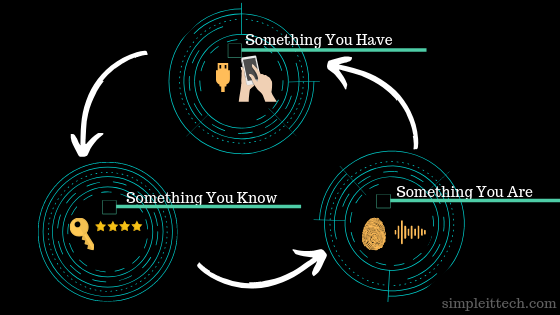
Using any combination of these 3 groups we can create a two factor authentication method to provide an extra layer of security.
Two factor authentication: Do we really need it?
Now we have seen the use of two factor authentication but still, the question comes to us why we need this two-level of authentication.
To better understand the need of the second layer of authentication let me take you to the story of
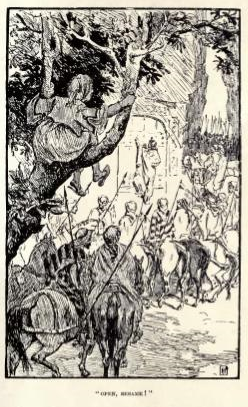
“Ali Baba and the forty thieves”.
Most of us heard this story in our childhood or in some part of our life that how Ali Baba overheard the secret voice command(“Open Sesame Open ”) from the thieves to open the rock of the cave to enter where he was easily able to take the gold as much as he can and close the door.
The point here to bring this story is that what if the thieves had a second level of authentication along with the famous voice command
(pinch the horse’s ear or handprint of the head of the thieves. Eh! PJ 😉 )
then it would be difficult or next to impossible for Ali baba to open the door just by the voice command what he heard it from them.
This is just to bring the importance of having an extra feature where the proof of identification is coming from the owner itself.
If we have the only password to protect then for the intruder has to attack to break the single mode of authentication to gain access and if there is two factor authentication then he has to wage multiple successful attacks on both methods to break through which usually very difficult to achieve.
Knowing the importance of two factor authentication most of the online services implement this feature, for example, the banking sector sends SMS codes to the registered mobile phones or use a device to generate a PIN to log in or while doing any transaction along with the usual login credentials.
Two factor authentication: why it is neglected?
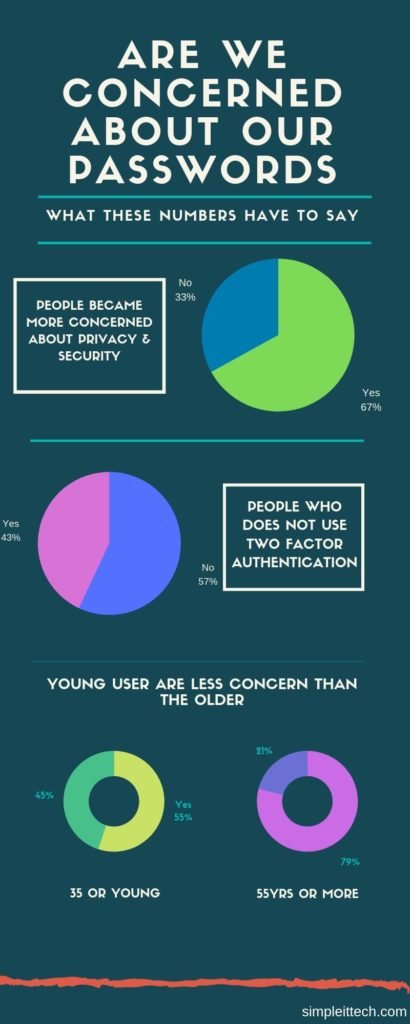
As per the recent research by Ponemon Institute it shows that around 67% of people have become more concerned about securing the password yet 57% of people have not changed the behavior of the password used. That means there was no two factor authentication implemented.
Most common reasons for not using the two factor authentication can be listed out as
- It is not easy to manage the passwords
- Extra wait time during the logon or transaction
- Fear of losing the device used for the second level of authentication.
- Not easy to remember the security bypass codes for the recovery process
Most of us feel like it is very difficult to manage the different passwords while maintaining the complexity in the passwords. Along with this it generally takes time when we use 2nd level of authentication either by SMS or token generation device where we have to wait for the SMS to arrive to the telephone or for the PIN to be generated by the device.
We even think what if we lose the device to authenticate let’s say we use our smartphones to get the second level authentication by using a mobile authenticator app that has lost. Then how is it possible to login without the phone then we should have the recovery process or bypass method to use another form of authentication. Even the recovery codes which are used to bypass or use as an alternate method to authenticate are not easy to remember and lead to poor handling of the data.
So these few things are keeping most of the users away from using the two factor authentication in most of the places unless it is been imposed as a compulsory method of verification.
How to Enable 2FA: Step-by-Step
Here’s how to enable 2FA on the most common platforms:
Gmail / Google Account:
- Go to myaccount.google.com → Security
- Click “2-Step Verification” → Get Started
- Choose your method (authenticator app recommended)
- Scan the QR code with Google Authenticator or Authy
- Save your backup codes somewhere safe
Apple ID:
- Settings → [Your Name] → Password & Security
- Tap “Turn On Two-Factor Authentication”
- Enter a trusted phone number
Microsoft Account:
- account.microsoft.com → Security → Advanced Security Options
- Click “Add a new way to sign in”
- Choose Microsoft Authenticator
Instagram / Facebook:
- Settings → Security → Two-Factor Authentication
- Select “Authentication App” (avoid SMS if possible)
2FA vs MFA: What’s the Difference?
2FA (Two-Factor Authentication) requires exactly two verification factors. MFA (Multi-Factor Authentication) requires two or more.
In practice, the terms are used interchangeably. Most consumer apps offering “MFA” are using exactly two factors. Enterprise environments may layer three or more for higher-security systems.
What About Passkeys? The Future of Authentication
Passkeys are an emerging standard (backed by Apple, Google, and Microsoft) that replaces passwords entirely with biometric verification tied to your device. They’re phishing-resistant by design and are beginning to roll out across major platforms. While 2FA isn’t going away tomorrow, passkeys represent the next evolution of authentication security.
Which Accounts Should You Protect With 2FA First?
Prioritize in this order:
- Email — your email is the master key to every other account via password resets
- Banking and financial accounts
- Work accounts (Microsoft 365, Google Workspace, Slack)
- Social media accounts with a large following or business use
- Cloud storage (Google Drive, Dropbox, iCloud)
Conclusion: 2FA Isn’t Optional Anymore
Two-factor authentication is one of the highest-impact, lowest-effort security upgrades available to anyone online. With cyberattacks growing more sophisticated every year and passwords being routinely compromised in mass data breaches, relying on a password alone is no longer a reasonable risk.
Set up an authenticator app on your most critical accounts today. It takes less than five minutes and could prevent a breach that costs you far more — in money, data, or reputation.
Frequently Asked Questions About Two-Factor Authentication (2FA)
Q: What is the safest form of two-factor authentication? Hardware security keys (like YubiKey) are the most secure form of 2FA. They use phishing-resistant FIDO2 protocols and cannot be intercepted remotely. For most everyday users, authenticator apps like Google Authenticator or Authy are the next best option.
Q: Can two-factor authentication be hacked? No method is 100% unbreakable, but 2FA makes hacking significantly harder. SMS-based 2FA can be compromised via SIM swapping. Authenticator apps and hardware keys are much more resistant. The key takeaway: any 2FA is vastly better than none.
Q: What happens if I lose my phone and I have 2FA enabled? Most services provide backup codes when you first set up 2FA — store these somewhere safe (printed or in a password manager). You can also pre-register a backup phone number or secondary device before losing access.
Q: Is two-factor authentication the same as multi-factor authentication? Almost. 2FA requires exactly two verification factors. MFA (Multi-Factor Authentication) requires two or more. In everyday use, the terms are often used interchangeably, but enterprise systems may layer additional factors for higher security.
Q: Do I need 2FA if I already have a strong password? Yes. Strong passwords protect against guessing attacks, but they don’t protect you from phishing, data breaches, or malware that steals your credentials. 2FA adds a layer that works even when your password is already compromised.
Q: Which accounts should have 2FA enabled? At minimum: your email, banking, and work accounts. These are the highest-value targets. From there, extend 2FA to social media, cloud storage, and any account linked to payment information.
Q: Is SMS-based 2FA safe? It’s better than no 2FA, but it’s the weakest option. SMS codes can be intercepted through SIM swapping attacks. Whenever a service offers an authenticator app as an alternative, choose that instead.
Q: How long does it take to set up 2FA? Usually under five minutes per account. Most platforms guide you through the process step by step, and scanning a QR code with an authenticator app takes seconds.
Q: Is 2FA mandatory? Increasingly, yes — in regulated industries like banking, healthcare, and government, 2FA is legally required under standards like PCI DSS and GDPR. For personal accounts, it’s still optional on most platforms but strongly recommended.
Q: What is TOTP and how does it relate to 2FA? TOTP stands for Time-Based One-Time Password. It’s the technology behind authenticator apps — generating a 6-digit code that refreshes every 30 seconds. It’s one of the most widely used and reliable 2FA methods available today.